




There has been considerable media attention recently around the removal of credit card surcharges and the Australian Taxation Office's (ATO) announcement that they will no longer accept credit cards for tax bill payments.
While businesses now need to absorb the processing fees of credit card payments, for the government these credit card fees are estimated to cost $200 million annually, and they were reluctant to absorb this expense themselves.
Initially, the ATO announced that they would stop accepting credit card payments on 31 October 2026, however due to business and media pressure they have now advised that whilst they investigate further, they will continue to receive credit card payments until 30 June 2027.
So how do you pay your ATO bills by credit card?
Set up and link your business to the ATO
Firstly, you need to register for ATO’s online services as follows:
- myID, setup the myID app and you will need to have a “strong” profile
Individuals & Sole Trader Businesses
- Once logged in this is a simple process to link the ATO
Entities i.e. Companies and Trusts
- Firstly, you will need to be registered with the ATO as an Associate. This is typically done when you apply for your tax file number or ABN, we can ensure that you are set up as an associate
- Log in to the government Relational Authorisation Manager “RAM” website
- Link the business to your RAM
For more information see the ATO's online services page.
How to make a payment
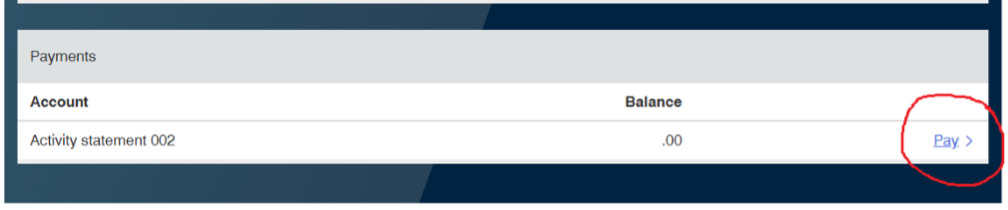
- Log in to the myID app, locate the amount due and click on the pay button
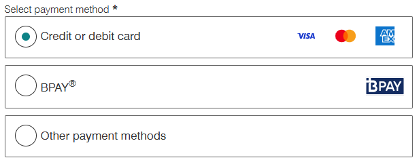
- Select the payment method, in this case Credit or debit card
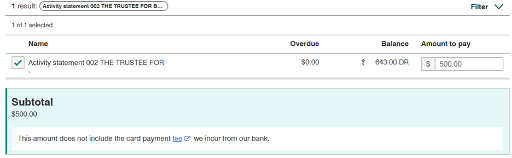
- Enter the amount you wish to pay (defaults to the full amount)
- Enter your credit card details
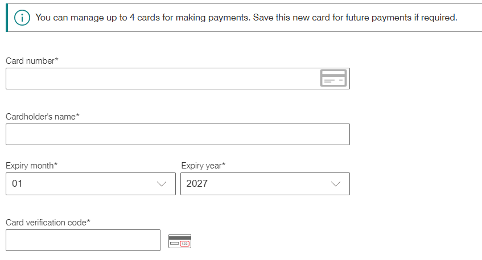
- Click on the pay button
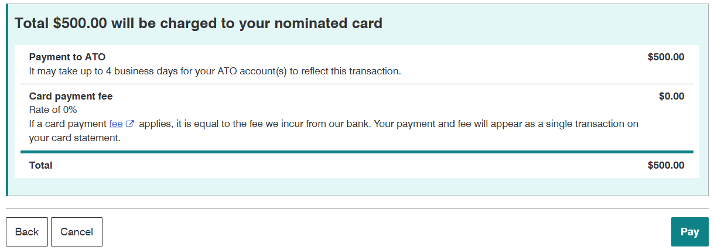
- Retain a copy of the payment details
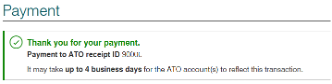
ATO Payments are not processed immediately and can take up to 4 days. We recommend that you check in 4 days’ time to ensure that they ATO have allocated it correctly (which will show up as follows):

If you need help navigating this or wish to discuss this further, please contact us.
Find more information about the ATO's online service payment options here.